Change setups without returning to the main app
Setup 1, 2 and 3 can also be selected directly from the Overlay. If you prefer manual control, click the setup you want and continue the run with that configured equipment active in EntropiaControl.
EntropiaControl Pro
See your run live, keep your setups in context and use your own history to understand what happened.
EntropiaControl Pro gives you more control over the information behind your hunting — from the equipment you configure and the setups you use while playing to the live performance of the run, its economics and the history you build over time.
$24.99 USD · 365 days of Pro access
$24.99 USD · 365 days
One-time payment. No subscription.
Windows PC application
For Entropia Universe hunting.
01 / Advanced Overlay
Advanced Overlay puts the information from your current run directly in front of you while you play. Instead of returning to the main window every time you want to check what is happening, you can keep the live information you care about on screen.
CARD is the most complete Overlay mode. It can keep combat metrics and run economics visible at the same time, including attack performance, DPP, DPS, observed damage, kills, costs, ROI, Net, Last Kill and other live session information.
Pro can keep the information from your current run directly on screen while you hunt. CARD gives you the complete live view; BAR gives you a compact option when you want less on screen. You can also change Setup 1, 2 or 3 from the Overlay or use Auto 1-3 with your matching game hotkeys.
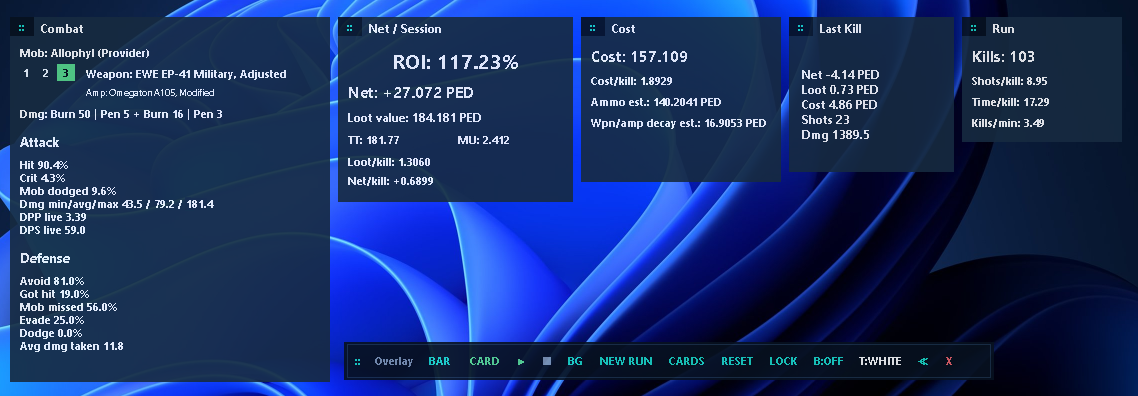
You decide how much you want to see. Show the cards that matter to you, hide the ones you do not need, move them to the positions that work for your screen and lock them there when you are finished arranging them.
When you want the game to remain visible underneath, use the transparent background mode. When readability is more important, keep a solid background. Text and border options give you additional control over how the Overlay looks against different scenes.
Setup 1, 2 and 3 can also be selected directly from the Overlay. If you prefer manual control, click the setup you want and continue the run with that configured equipment active in EntropiaControl.
Place the weapons or attack tools you want to use on your Entropia Universe hotkeys 1, 2 and 3, in whichever order makes sense for you. When you use one of those matching hotkeys while playing, EntropiaControl switches to the corresponding setup.
Auto 1-3 does not equip weapons for you and does not inspect which weapon is equipped inside Entropia Universe. Your game hotkeys and EntropiaControl setups need to correspond.

CARD for more detail. BAR when you want a lighter view.
Auto 1-3 follows matching setup hotkeys; it does not equip or detect weapons.

02 / Setup Profiles + Auto 1-3
Hunting does not always mean using one weapon from the first attack to the last. Pro lets you keep three equipment setups ready inside a Setup Profile and move between them without rebuilding your configuration every time.
A hunt does not always use one weapon from beginning to end. Each Setup Profile can keep three equipment setups ready, whether you want to test different configurations or switch between the weapons you normally use during the same run.
With Auto 1-3, EntropiaControl can follow the corresponding 1, 2 and 3 hotkeys you use while playing.

Setup 1 can hold the base weapon. Setup 2 can add an amplifier. Setup 3 can contain a more complete configuration with the equipment you want to test.
That gives you a practical way to use different configurations during real play instead of constantly removing, searching for and rebuilding the same equipment inside EntropiaControl.
One player may open at range, switch to a melee or main weapon when the mob gets close and use another weapon for finishing or a specialized role. Another player may arrange those three completely differently.
The order is yours. Setup 1, 2 and 3 are simply the three configurations you want ready for quick use.
Each Setup Profile can keep its own saved setups 1, 2 and 3. That lets you prepare different groups of equipment for different hunting contexts without turning the interface into a long row of permanent weapon slots.
Setup Profile is the larger configuration. Setup 1, 2 and 3 are the fast changes you use inside it.
03 / Analytics
Overlay shows what is happening now; Analytics helps you understand how the run developed and analyze it in context.
A run can finish at 80%, 100% or 130%, but the final percentage by itself does not explain how the session developed.
Analytics brings together the economics of the run, its observed execution metrics, setup context and the historical evidence available for comparison.
Run KPIs summarize what happened across the session rather than describing one individual kill. Metrics such as cost per kill, attacks or shots per kill, time per kill and other observed averages help describe how the run actually developed.
Overlay = live / kill-by-kill context.
Analytics = aggregated run context.
Analytics combines its KPIs, setup context and your recorded history to give the result more context.
Decision Engine v2 adds State, Confidence, Why and an Action to consider. Confidence reflects the strength of the available evidence — not your chance of profit or good loot.
Numbers can tell you what happened. Decision Engine v2 helps put those numbers into context.
It evaluates the current run against the relevant evidence available from your recorded activity and presents a State, Confidence, an explanation of why that state was reached and an Action to consider.
Equipment
The cost of hunting is not only the weapon. Pro lets you configure the equipment EntropiaControl should use when working with your activity.
Keep the weapon, amplifier, scope, sights and supported enhancer effects together with the setup being used.
When reference information is missing or incorrect, you can also add or correct local weapon data instead of being completely dependent on an external catalog entry.
Supported ammo, decay and equipment-related effects are incorporated according to the configuration EntropiaControl has available.
View the Setup / Equipment screen above ↑Keep your weapon, amplifier, scope, sights and supported enhancers in context so EntropiaControl can work with the equipment behind the run. If reference data is missing or wrong, you can also add or correct local weapon information.

Mob Explorer + Recommendation
Mob Explorer keeps useful reference information closer to the rest of your workflow. Search mobs, inspect available maturities, health and other reference information without having to leave EntropiaControl for every basic lookup.
Search mobs, maturities, HP and available reference information without leaving EntropiaControl for every basic lookup. Recommendation can also use your configured setup to help narrow the mobs that may be worth exploring.
Reference and estimation tool — not a profit predictor.

Recommendation can use your configured weapon and combat inputs to explore mobs that may fit the setup you are considering.
The goal is to help narrow the search and give you reference candidates — not to tell you which mob will be profitable.
Recommendation is an estimation and reference tool, not a loot or profit predictor.
History
A single run tells you what happened once. History turns those individual runs into a record you can work with over time.
Review the sessions you recorded and return to their costs, returns, TT, recorded MU, Net, ROI, kills and saved context instead of trying to reconstruct everything from memory.
History keeps your runs together so you can return to costs, returns, TT, recorded MU, Net, ROI and the context behind each session instead of relying on memory.
History gives that question somewhere concrete to live. As your runs accumulate, you can go back through the record, filter what you are looking at and compare periods or sessions instead of relying on how a hunt felt.
Think of History as the administrative record of your EntropiaControl activity — the place where isolated runs become organized information you can review later.
Export recorded run information for your own reporting, statistical review or spreadsheet workflow.
Free includes the foundation of History. Pro expands the tools and context available around the activity you accumulate.
When you want more detail, open a run to inspect the economics, activity and loot behind that entry. Recorded data can also be exported for your own reporting or spreadsheet analysis.

Detailed Run Report
History tells you which run you want to inspect. The detailed report lets you open that session and look at what was recorded behind its result.
Review the run summary, economics, activity, loot composition and other available information from that session.
A final percentage becomes much more useful when you can return to the activity that produced it.
TradeEdge
Looking for an item? Waiting for someone buying something you sell? Following a player or a specific term?
TradeEdge watches the recorded chat log for the keywords you choose and surfaces matching messages so you do not have to continuously scan every line yourself.
Matching messages can be organized according to the information detected and new matches can use the available alerts.
TradeEdge watches your recorded chat for the items, players or keywords you care about and can surface new matches through its available alerts.
Free → Pro
EntropiaControl Free gives you 60 days to experience the core tracking workflow before deciding whether Pro is right for you.
Pro records runs in its own History. It does not include a tool to import History from another edition.
Free · 60 days · $0
Try the core tracking workflow first, then compare Free and Pro when you're ready.
Mining + Fishing
Pro is also the required base for the dedicated Mining and Fishing add-ons.
Add tools built around mining equipment, activity, claims, costs, positioning and mining-specific reference information.
Explore MiningAdd fishing-specific setups, activity tracking, locations, maps and supporting tools for the fishing workflow.
Explore FishingMining and Fishing are separate one-time add-ons. Active Pro is required to use them.
Dedicated tools for mining activity, equipment, claims and positioning.
Explore MiningSeparate one-time add-ons. Active Pro required.
EntropiaControl Pro
Keep the run visible while you play. Keep the equipment behind it in context. Understand what accumulated across the session. And build an administrative history you can return to when memory is no longer enough.
$24.99 USD · 365 days of Pro access
$24.99 USD · 365 days
One-time payment. No subscription.